The Compare & Shortlist Tool: How VegaDigi Lets You Line Up Multiple Source Codes Side-by-Side Before You Buy
· VegaDigi Journal
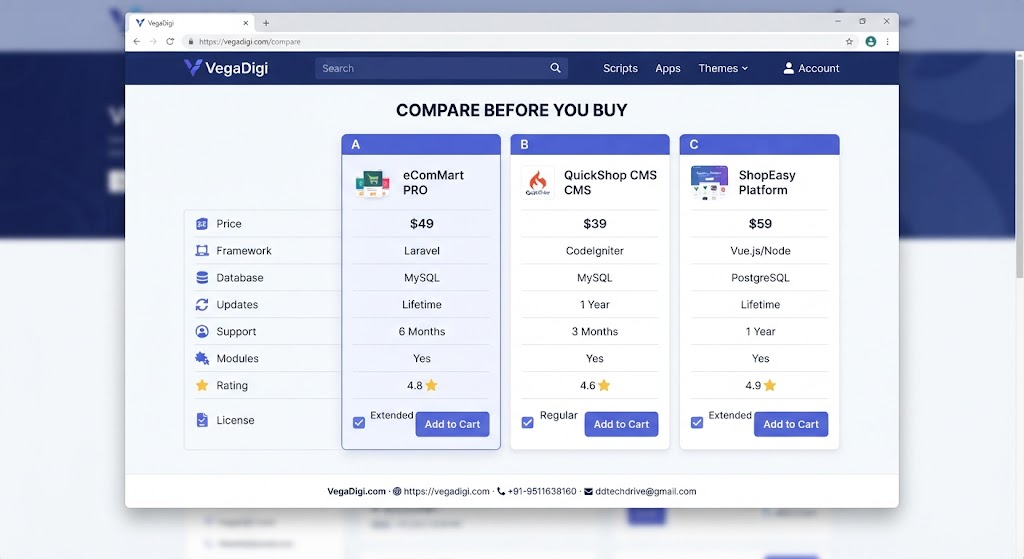
If you've ever browsed a digital products marketplace, you know the feeling: two listings look almost identical, and you're not sure which one actually fits your project. On VegaDigi, there's a quieter feature built exactly for this moment — the shortlist and compare tool — and it's worth knowing about before your next purchase.
Why comparing matters more than you think
When you're picking a source code for a client project or your own startup, small differences add up. A category badge, a product description detail, a screenshot of the admin panel — these things matter once you're the one customizing and setting it up. Jumping between browser tabs to keep track of two or three listings is clunky and easy to get wrong. That's the exact friction this tool removes.
How the shortlist and compare feature works
As you browse VegaDigi's marketplace, you can add any product you're considering to a shortlist instead of committing right away. Once you've got two or more items shortlisted, you can open a compare view that lines them up together. Instead of scrolling back and forth, you see the relevant details in one place, which makes it far easier to spot what actually separates one product from another.
Who actually benefits from this
Freelancers weighing a PHP script against a similar SaaS starter for a client brief. Agencies scanning multiple ecommerce foundations before recommending one internally. Students exploring different Android app source codes to see how experienced developers structured a project. Non-technical founders trying to understand, at a glance, which product foundation is closer to their idea. In every one of these cases, comparing side-by-side beats opening ten browser tabs and losing track of which is which.
A small tool, a bigger point about buying decisions
It's easy to assume a marketplace is just a place to browse and checkout. But the tools around the browsing experience — filters, previews, and now comparison — are what actually help you avoid a bad purchase decision. Ready-made source code only helps you move faster if you pick the right starting point in the first place, and that starts with being able to evaluate your options properly instead of picking the first thing that looks close enough.
My take: if you're the type who buys the first product that looks decent, slow down and use the shortlist before you check out — it takes two extra minutes and can save you from customizing the wrong foundation. If you already know exactly what you need and there's only one clear match, skip it and go straight to the live demo instead. Either way, it's a good sign when a marketplace builds tools around your decision-making, not just its own checkout flow.