Start Selling on VegaDigi
Join 8,000+ creators earning from their digital products. Fill the form — our team will reach out within 24 hours.
Hi there! 👋 I'm your VegaDigi AI assistant.
Ask me anything — find products, compare prices, get recommendations, or learn about our services.
Qintrix Print Agent
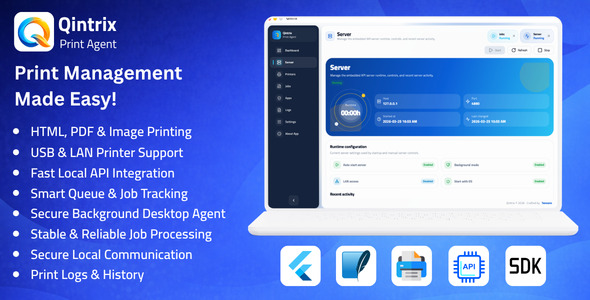
Qintrix is a desktop print agent designed to connect web applications, internal systems, and business platforms with local printers in a secure and reliable way. It provides a local API-based printing workflow with printer management, qu…
- Local API server for printing workflows
- Support for Text, PDF, and Image print jobs
- Printer management with add, edit, enable, disable, test, and delete actions
- Application management with API keys and printer access rules
- Queue management with pause, resume, retry, and status tracking
Everything You Need Out of the Box
Carefully crafted features that ship with this product — no extra setup, no hidden costs.
Local API server for printing workflows
Support for Text, PDF, and Image print jobs
Printer management with add, edit, enable, disable, test, and delete actions
Application management with API keys and printer access rules
Queue management with pause, resume, retry, and status tracking
Job lifecycle tracking for accepted, queued, processing, completed, failed, and canceled jobs
Support for system spooler and TCP/network printer workflows
Operational logs and diagnostic records
Customer Rating
4.5/5 From 75 verified buyersSales
1,375+ Trusted by businesses worldwideSetup Time
< 5 min From download to liveBuilt to Scale & Convert
Qintrix is a desktop print agent designed to connect web applications, internal systems, and business platforms with local printers in a secure and reliable way. It provides a local API-based printing workflow with printer management, queue control, job tracking, and diagnostic visibility for real operational environments.
Main Features
- Local API server for printing workflows
- Support for Text, PDF, and Image print jobs
- Printer management with add, edit, enable, disable, test, and delete actions
- Application management with API keys and printer access rules
- Queue management with pause, resume, retry, and status tracking
- Job lifecycle tracking for accepted, queued, processing, completed, failed, and canceled jobs
- Support for system spooler and TCP/network printer workflows
- Operational logs and diagnostic records
- Background mode and startup support
- English and Arabic interface support
Why Choose Qintrix?
- Provides a reliable local printing workflow for business systems
- Reduces the complexity of browser-to-printer integration
- Improves control through centralized printer and application management
- Helps operations teams monitor print jobs and troubleshoot issues faster
- Offers a structured foundation for production-ready print environments
Application Modules
- Dashboard: Overview of server status, recent jobs, and activity
- Server Management: Start, stop, restart, and monitor the local server
- Printers: Manage printers and test printer connectivity
- Applications: Register apps, generate API keys, and assign printer permissions
- Jobs: Track all print jobs and their current statuses
- Logs: Review system activity and diagnostic records
- Settings: Configure language, startup behavior, retry rules, and system options
Use Cases
- Restaurant and café order printing
- POS receipt printing
- Warehouse and shipping label printing
- Office and internal document printing
- Ticket and counter slip printing
- Any business application that requires secure local printer access
Technical Information
Qintrix is designed as a development-ready desktop printing infrastructure application for teams that need a stable bridge between software systems and local printer environments. The codebase is structured for real product usage, customization, and long-term extension rather than a simple proof of concept.
| Core Stack | Built with Flutter and Dart for a unified cross-platform desktop application targeting macOS, Windows, and Linux. |
| Application Architecture | Organized into dedicated modules for dashboard, server runtime, printers, apps, jobs, logs, and settings to support maintainability and feature expansion. |
| Embedded API Layer | Includes a local HTTP API for health checks, printer listing, printer testing, print job creation, job inspection, retry and cancel actions, and queue control operations. |
| Authorization Model | Uses API-key-based application authorization with enabled or disabled app states and optional printer-level access restrictions. |
| Local Persistence | Stores settings, printers, registered apps, print jobs, and log records in a local SQLite-based persistence layer for stable desktop operation. |
| Supported Job Types | Supports text, PDF, and image print jobs for different operational scenarios and integration requirements. |
| Printer Connectivity | Supports system spooler printers, TCP/network printers, and supported raw ESC/POS-oriented workflows for receipt and operational printing setups. |
| Queue & Execution Engine | Includes ordered print queue processing, pause and resume controls, retry handling, status transitions, and execution tracking for more reliable operations. |
| Diagnostics | Provides job-level status details, failure metadata, runtime activity logs, printer test results, and operational visibility for easier debugging and support. |
| Developer Integration | Includes a browser-first TypeScript Web SDK workflow for connecting web applications to the local Qintrix agent with a clean client-side integration pattern. |
| Localization | Includes multilingual interface support with English and Arabic language availability. |
| Development Readiness | Structured code organization, documentation, and test coverage make the project suitable for customization, white-label adaptation, and continued application development. |
From Purchase to Launch in 4 Simple Steps
Get up and running in minutes — no fluff, no waiting around.
Purchase Securely
Complete checkout via Razorpay-secured payment.
Instant Download
Files are available immediately in your account.
Quick Setup
Follow the included docs — usually under 5 minutes.
Launch & Grow
Customize, deploy, and scale to your audience.
What Buyers Are Saying
Based on 75 verified reviews
"Excellent quality and instant delivery. The documentation is super clear and setup was a breeze. Highly recommend!"
"Perfect for our use case. Saved us weeks of development time. Support team responded within an hour."
"Clean code, easy to customize. Worth every rupee. Looking forward to future updates."
Get Qintrix Print Agent
Join 1,375+ customers who trust this product to power their business.